Your Mic Is Hearing Your Keyboard: Fixing Keystroke Noise in a Dictation Setup
By FreqDeck · 8 min read · Updated September 2026
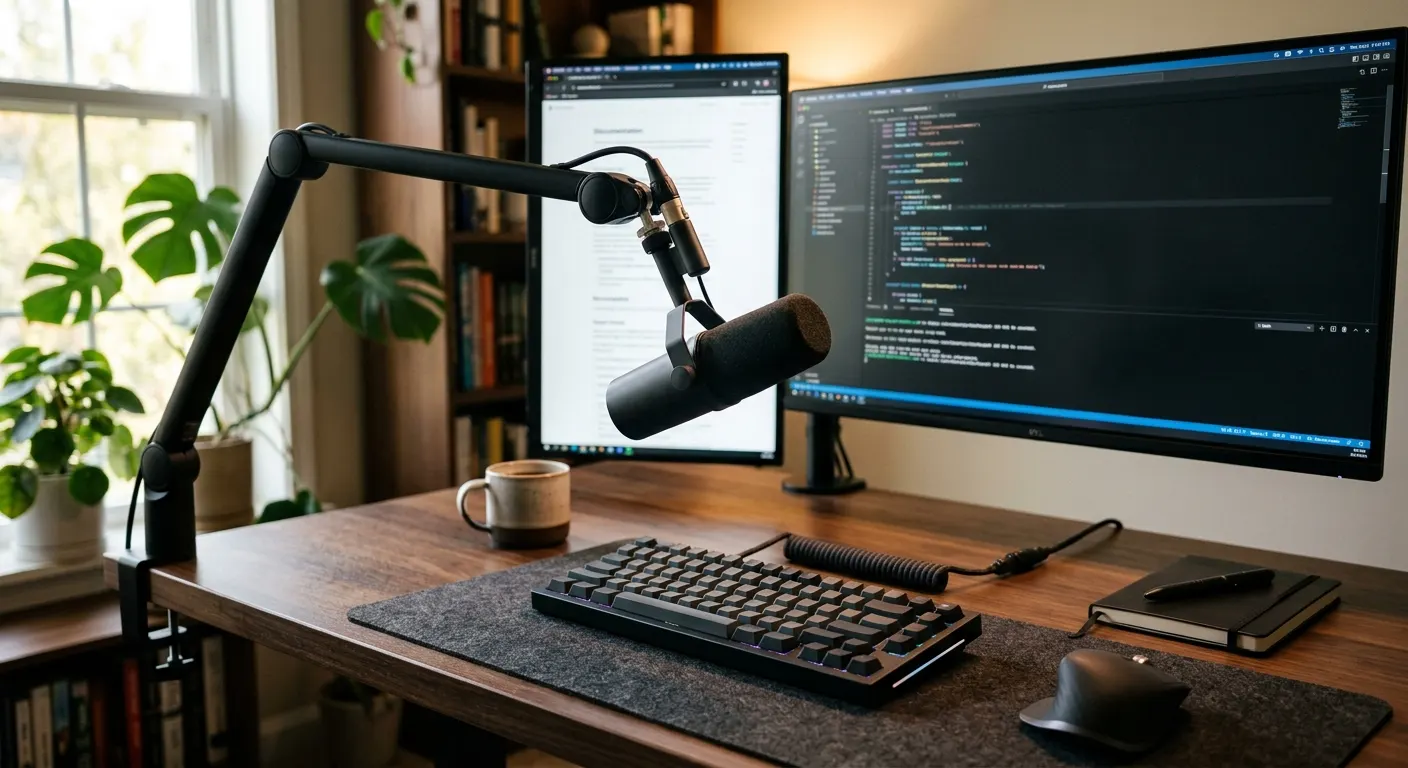
Keystroke noise sneaking into a dictation recording is one of the most common complaints from developers who voice-code on a mechanical keyboard while a microphone sits nearby. The clatter shows up as a low rumble, a sharp click, or both, and it can drag down transcription accuracy in Whisper-based tools just as much as room noise does. This guide walks through the diagnosis first, since a shock mount fixes a different problem than a tighter polar pattern does, then covers the fix for every setup from a budget InnoGear boom arm and InnoGear shock mount combo to a full Rode PSA1+ and Shure MV7+ setup, and closes with the Jabra Evolve2 55 as the software fallback for a desk that will not stop vibrating.
Quick answer
Keystroke noise usually enters a dictation mic two ways: mechanical vibration through the desk into the mic body, and airborne clatter picked up off-axis by a wide polar pattern. A shock mount like the InnoGear Universal Shock Mount fixes vibration. A tighter cardioid mic like the Audio-Technica ATR2100x-USB or a proper boom arm fixes the airborne path.
This guide contains affiliate links. FreqDeck may earn a commission at no cost to you.
Why does a dictation mic pick up keyboard clicks in the first place?
The Audio-Technica ATR2100x-USB and every other desk microphone can pick up keyboard clicks through two separate paths at once, mechanical vibration traveling through the desk into the mic body, and airborne clatter entering the capsule from the side or rear.
A mechanical keyboard on a hollow-core or thin desk transmits the most vibration, because every keystroke produces a small shock that travels through the desk surface into a mic stand or boom arm base and into the microphone body itself. This shows up as a low-frequency thump in the recording that lines up exactly with your typing rhythm.
The FIFINE AM8 addresses only the vibration path with its built-in shock mount base, which isolates the capsule from desk-transmitted rumble per the product listing, but its cardioid pattern is looser than the pattern on the Audio-Technica ATR2100x-USB per each brand spec sheet, so it still lets in more airborne clatter from the side.

Audio-Technica ATR2100x-USB
A dynamic cardioid mic with both USB-C and XLR outputs, clean preamp, and a warm sound character. A long-running developer favorite for AI dictation on a tight budget.

FIFINE AM8 Dynamic USB Microphone
A dynamic cardioid USB-C microphone with a built-in shock mount base, touch mute, and a backlit ring. Competitive noise rejection for under $80.
Is the noise coming through the desk or through the air?
Before buying anything, put on headphones, monitor the microphone live, for example the Shure MV7+ in USB mode, and knock twice on the desk a few inches from the mic base while typing normally to compare which action produces the louder thump.
If knocking the desk reproduces the same low thud you hear while typing, the problem is mechanical vibration traveling through the desk and mic stand, and a shock mount is the fix, not a different microphone. If the thump from knocking is much quieter than the clatter from actual typing, the microphone capsule is picking up the sound of the keys through the air off-axis, and the fix is a tighter polar pattern or a better mic position instead.
Run this test with the boom arm you already own, since a boom arm base sitting on the same desk as the keyboard can transmit vibration just as easily as a desk stand. Isolating the two causes before buying anything prevents spending money on a shock mount like the InnoGear Universal Shock Mount when the real problem is a loose cardioid pattern picking up air noise instead.

Shure MV7+
An evolved USB/XLR dynamic mic with onboard touch controls, a backlit EQ panel, and Shure's ShurePlus MOTIV app for real-time voice processing. A credible alternative to the Rode PodMic USB for voice-coding setups.
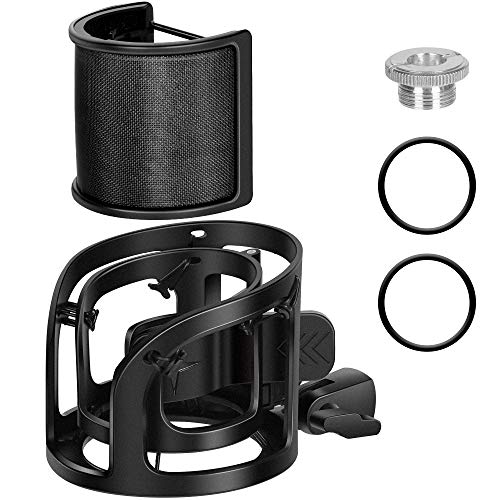
InnoGear Universal Shock Mount
A budget elastic shock mount with a universal 5/8-inch thread adapter that fits most USB microphones and reduces desk vibration noise for a cleaner dictation signal.
Does a shock mount fix keystroke rumble on its own?
A shock mount such as the InnoGear Universal Shock Mount fixes the vibration path specifically, using elastic suspension bands that hold the microphone body away from rigid contact with the stand or boom arm, so a desk thump from typing never reaches the capsule directly.
For Rode condenser microphones, the Rode SM6 Shock Mount adds an integrated pop filter alongside the same elastic suspension design, per the Rode product page, which is useful if plosive sounds from fast dictation speech are also a problem alongside keystroke rumble.
A shock mount does nothing for airborne noise. If your diagnostic test in the previous section showed that typing sound reaches the mic through the air rather than through desk vibration, adding the InnoGear Universal Shock Mount or the Rode SM6 Shock Mount with Pop Filter will not reduce the clatter in a recording, because the capsule is still open to sound arriving off-axis.
InnoGear Universal Shock Mount
A budget elastic shock mount with a universal 5/8-inch thread adapter that fits most USB microphones and reduces desk vibration noise for a cleaner dictation signal.

Rode SM6 Shock Mount with Pop Filter
Rode's premium shock mount with an integrated pop filter and elastic suspension, designed for Rode condenser microphones. Isolates the capsule from desk vibration transmitted through the boom arm.
Does switching to a tighter cardioid mic fix airborne keyboard noise?
The Audio-Technica ATR2100x-USB uses a dynamic cardioid capsule that rejects sound arriving from the side and rear more aggressively than a wide-pattern condenser, per the Audio-Technica spec sheet, which is the direct fix for keyboard clatter entering through the air rather than through the desk.
Dynamic capsules are inherently less sensitive to off-axis sound than condenser capsules, because the moving-coil design responds mainly to sound arriving directly on-axis. The Shure MV7+ uses the same dynamic cardioid approach and adds onboard touch controls for gain and monitor mix, per the Shure product page, so gain can be lowered after switching mics without opening a separate software mixer.
The trade-off is real: a dynamic mic needs more gain to reach the same recording level as a sensitive condenser, and raising gain too far reintroduces preamp hiss. After switching to the Audio-Technica ATR2100x-USB or the Shure MV7+, set input gain so a normal speaking voice peaks around 60 to 70 percent on the input meter, then retest the desk-knock and typing comparison from the diagnostic step.
Audio-Technica ATR2100x-USB
A dynamic cardioid mic with both USB-C and XLR outputs, clean preamp, and a warm sound character. A long-running developer favorite for AI dictation on a tight budget.
Shure MV7+
An evolved USB/XLR dynamic mic with onboard touch controls, a backlit EQ panel, and Shure's ShurePlus MOTIV app for real-time voice processing. A credible alternative to the Rode PodMic USB for voice-coding setups.
Does a boom arm help even after fixing vibration and pattern?
A boom arm like the Rode PSA1+ removes the microphone base from direct contact with the same desk surface the keyboard sits on, which reduces the vibration path even before a shock mount is added, and lets the mic sit farther from the keyboard without losing proximity to your mouth.
The Elgato Wave Mic Arm Low Profile keeps the mic low and out of a webcam frame while still lifting it off the desk, and the InnoGear Heavy Duty Microphone Boom Arm is a lower-cost starting point for the same repositioning, though its external cable routing means desk vibration can still transfer through the cable clamp if the cable touches the same surface as the keyboard.
Combine a boom arm with a shock mount for the most complete fix: the Rode PSA1+ Professional Swivel Mount Studio Arm paired with the InnoGear Universal Shock Mount or the Rode SM6 Shock Mount with Pop Filter removes both the desk-contact vibration path and gives the capsule its own elastic isolation, which is the setup most developers land on after working through a keystroke-noise complaint.

Rode PSA1+ Professional Swivel Mount Studio Arm
The professional broadcast studio arm that handles heavier mics like the Rode PodMic USB without sagging, with full internal cable routing and smooth friction-controlled movement.

Elgato Wave Mic Arm Low Profile
A low-profile boom arm designed to keep the microphone in the lower field of view, out of the webcam frame, with internal cable routing and a desk clamp rated for lighter mics.

InnoGear Heavy Duty Microphone Boom Arm
A budget steel boom arm with dual-spring tension, desk clamp, and 5/8-inch thread. A reliable first boom arm for developers who need positioning without spending $100.
What about desk-flat mics like the SpeechWare TableMike, do they still pick up the keyboard?
The SpeechWare TableMike sits flat on the desk with no boom arm required, which means it has direct rigid contact with the same surface a keyboard rests on and offers no built-in vibration isolation, per its product description, so keystroke rumble can be a bigger problem on this dictation-specific mic than on an arm-mounted one.
Because the SpeechWare TableMike 6-in-1 is designed for a far-field pickup pattern that works from up to 50 centimeters, per the manufacturer spec, it is tuned to capture speech at a greater distance than a close-mic USB microphone, which also means it is less forgiving of nearby mechanical noise than a tightly cardioid close-mic setup.
If you use the SpeechWare TableMike 6-in-1 and hear keyboard clatter in your dictation, place a thin foam pad or a folded mouse pad under the mic base to dampen desk-transmitted vibration, since the device has no dedicated shock mount accessory in this catalog. Pair it with the Aokeo Professional Microphone Pop Filter if plosive sounds from dictation speech are a separate issue alongside the keystroke noise.
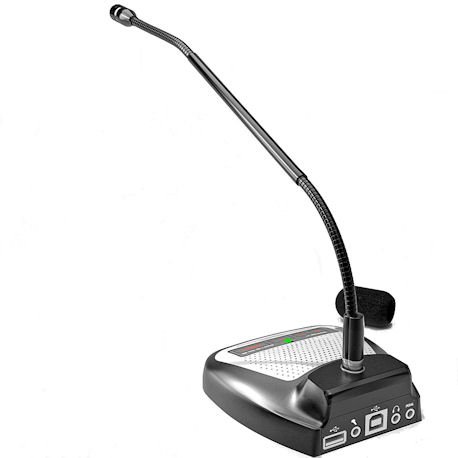
SpeechWare TableMike 6-in-1
A purpose-built desktop dictation microphone with a built-in pre-amp, USB, and a far-field pickup that works from up to 50 cm. Tuned specifically for Dragon NaturallySpeaking and Whisper-class transcription engines.

Aokeo Professional Microphone Pop Filter
A double-layer nylon mesh pop filter on a flexible gooseneck clamp that attaches to any boom arm and blocks plosive breath sounds without muffling high-frequency voice detail.
When does an AI noise-cancelling headset beat troubleshooting the desk mic?
If the desk still vibrates no matter what you mount the microphone on, for example a shared standing desk or a hollow-core surface that resonates with every keystroke, switching to an AI noise-cancelling headset like the Jabra Evolve2 55 removes the problem at the source by filtering keyboard noise out of the mic signal in software rather than isolating it mechanically.
The Jabra Evolve2 55 uses a six-microphone array with Jabra AI Audio processing, per the Jabra product page, which analyzes the outbound signal and strips non-voice sounds, including keyboard clicks, before the audio reaches a dictation app or a call. This software noise suppression works regardless of desk vibration because the headset microphone sits near your mouth, not on the vibrating surface.
A headset is not a universal upgrade for dictation accuracy, since a dedicated desk mic on a properly isolated stand still gives cleaner voice input in most comparisons. But when a shock mount, a boom arm, and a cardioid mic swap have all failed to quiet a genuinely resonant desk, the Jabra Evolve2 55 is the fastest way to stop keystroke noise from reaching a transcription tool.

Jabra Evolve2 55
The lighter sibling of the Evolve2 75 with six-microphone AI noise cancellation, a compact design, and Bluetooth multipoint for connecting to phone and computer simultaneously.
Featured in this guide
Audio-Technica ATR2100x-USB
A dynamic cardioid mic with both USB-C and XLR outputs, clean preamp, and a warm sound character. A long-running developer favorite for AI dictation on a tight budget.
Shure MV7+
An evolved USB/XLR dynamic mic with onboard touch controls, a backlit EQ panel, and Shure's ShurePlus MOTIV app for real-time voice processing. A credible alternative to the Rode PodMic USB for voice-coding setups.
Rode PSA1+ Professional Swivel Mount Studio Arm
The professional broadcast studio arm that handles heavier mics like the Rode PodMic USB without sagging, with full internal cable routing and smooth friction-controlled movement.
InnoGear Universal Shock Mount
A budget elastic shock mount with a universal 5/8-inch thread adapter that fits most USB microphones and reduces desk vibration noise for a cleaner dictation signal.
Rode SM6 Shock Mount with Pop Filter
Rode's premium shock mount with an integrated pop filter and elastic suspension, designed for Rode condenser microphones. Isolates the capsule from desk vibration transmitted through the boom arm.
Jabra Evolve2 55
The lighter sibling of the Evolve2 75 with six-microphone AI noise cancellation, a compact design, and Bluetooth multipoint for connecting to phone and computer simultaneously.
FAQ
Frequently asked questions
Why does my microphone pick up my keyboard while I dictate?+
A microphone picks up keyboard noise through two separate paths, mechanical vibration traveling through the desk into the mic stand and body, and airborne clatter entering the capsule off-axis. A shock mount such as the InnoGear Universal Shock Mount fixes the first path. A tighter cardioid mic such as the Audio-Technica ATR2100x-USB or the Shure MV7+ fixes the second. Test which one you have by knocking on the desk while monitoring through headphones before buying either fix.
Will a shock mount stop keyboard noise in a dictation recording?+
Only if the noise is mechanical vibration traveling through the desk. A shock mount like the InnoGear Universal Shock Mount or the Rode SM6 Shock Mount uses elastic suspension to isolate the capsule from a vibrating desk surface. If your keyboard noise is airborne, entering the capsule off-axis rather than through the stand, a shock mount will not reduce it and a tighter cardioid microphone is the better fix.
Does a boom arm help with keystroke noise on its own?+
Yes, partially. A boom arm such as the Rode PSA1+ or the Elgato Wave Mic Arm Low Profile removes the microphone base from direct contact with the same desk the keyboard sits on, cutting a significant part of the vibration path even before adding a shock mount. It does not fix airborne clatter picked up off-axis, so pairing a boom arm with a tighter cardioid mic or a shock mount gives the most complete fix.
Should I just switch to a headset instead of fixing my desk mic?+
An AI noise-cancelling headset like the Jabra Evolve2 55 is a good fallback when a shared or hollow-core desk keeps vibrating no matter what you mount the microphone on. Its six-microphone array with Jabra AI Audio processing strips keyboard clicks from the outbound signal in software. A properly isolated desk mic still gives cleaner input in most comparisons, so try a shock mount and boom arm first if your desk allows it.
Can a pop filter reduce keystroke noise?+
No, a pop filter such as the Aokeo Professional Microphone Pop Filter addresses plosive breath sounds on the letters P and B, not mechanical or airborne keyboard noise. It is a useful addition alongside a shock mount or a tighter cardioid mic, but it does not solve keystroke bleed on its own. Use it together with a vibration or polar-pattern fix rather than as a substitute for one.